I'm a self-taught indie developer crafting mobile games and web apps from scratch. Welcome to G12 Games.
I'm a 15-year-old self-taught developer from Maharashtra, India. I started coding out of curiosity and quickly fell in love with building things โ from mobile games to web platforms.
My journey started with Scratch, HTML, CSS and Javascript, and then expanded into Unity and C# for game development as I built more ambitious projects. Every project I build teaches me something new.
Beyond coding, I love learning how projects work, understanding the needs of my users, and making software that actually gets used. G12 Games is my creative lab where ideas become real products.
From Android games to educational quiz platforms โ here's what I've shipped so far.
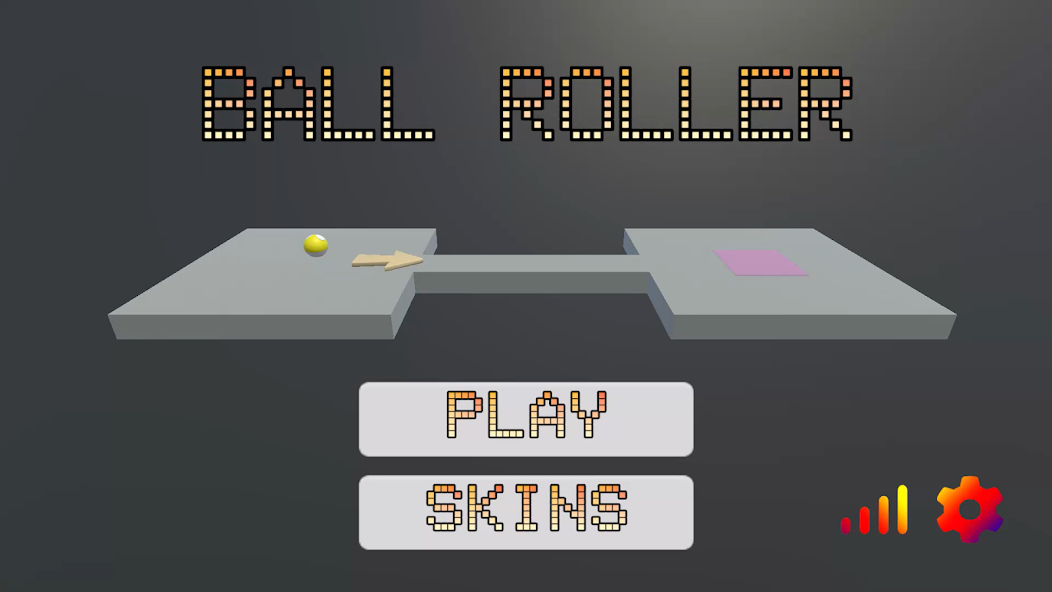
A fast-paced 3D platformer where you roll a ball through 15 progressively challenging levels. Simple controls, addictive gameplay, built for all ages.
India's quiz platform for ICSE Grade 10 students. Covers all major subjects with a chess-style ELO rating system, leaderboards, and instant feedback.
Smart billing and retail tracker for small businesses. Manage stock, track sales, generate invoices, accept UPI payments, and keep everything synced to the cloud.
Untangle neon arrows in this satisfying puzzle game! Strategically launch arrows and clear the cosmic grid in progressively complex brain-teasers.
A sleek, virtual 3D dice-rolling simulator for tabletop gaming, board games, and role-playing games. Features realistic physics-based rolling and multiple dice variants.
An exam-focused study companion built specifically for ICSE Class 10 students. Access practice MCQs, chapter notes, and previous year questions to boost exam scores.
A functional vehicle diagnostics utility designed to interface with OBD2 Bluetooth/Wi-Fi adapters. Reads real-time sensor data, retrieves engine fault codes, and clears MILs.
Thoughts on game dev, web development, and what I've learned building real projects as a teen developer in India.
When I first opened Unity, I had no idea what a Rigidbody was. I just wanted to make something I could show my friends โ something real, something playable. Eight months later, Ball Roller 3D was live on the Google Play Store. Here's what I actually learned building it from scratch.
The biggest trap new game developers fall into is trying to build the next big hit on their first attempt. I avoided this (barely) by picking the simplest mechanic I could think of: roll a ball, don't fall off. That's it. The genius of simple mechanics is that they let you focus all your energy on making the feeling of play right before worrying about content, story, or systems.
In Ball Roller 3D, getting the physics to feel satisfying took weeks. The ball needed to feel heavy but responsive. Too much friction and it felt sluggish; too little and it was impossible to control. Tuning these tiny values โ drag, angular drag, mass โ taught me more about game feel than any tutorial I'd watched.
I designed 15 levels, and the difficulty curve was the hardest part to get right. Early on, my "easy" levels were confusing and my "hard" levels were just annoying rather than challenging. The difference between a hard level that feels fair and one that feels cheap is about visual clarity and consistent rules. If a player fails, they need to immediately understand why โ and feel like they could do better with more skill.
I ended up playtesting each level dozens of times, and having a second developer (my co-dev) play through fresh to spot places where the design was unclear. Fresh eyes are invaluable. Never test your own game in isolation.
The publishing process was surprisingly technical. Google requires a signed APK, a privacy policy (even for simple games), screenshot assets in multiple resolutions, and a content rating questionnaire. Building the store listing taught me a lot about app marketing โ writing a description that actually explains the game, picking the right category, and optimizing for discoverability.
The most humbling moment? Watching the install count hover near zero for the first week. Organic discovery on the Play Store is brutally hard without any marketing budget. This pushed me to learn about ASO (App Store Optimization) and think more carefully about keywords and visuals.
Building Ball Roller 3D was the best education I've had. No classroom teaches you how to ship. If you're thinking about making a game, start today โ with the simplest idea you have. Done is better than perfect.
Padhai 24x7 started as a simple idea: what if studying for ICSE board exams felt less like a chore and more like a game? The ELO rating system โ borrowed from chess โ was the core hook. Here's how I built it and what surprised me along the way.
A lot of beginner developers think they need React, Next.js, or some big framework to build anything real. For Padhai 24x7, I went with plain HTML, CSS, and JavaScript โ and it was the right call. No build step, no dependencies to maintain, instant deployment via GitHub Pages. The entire project went from idea to live URL in a weekend.
The lesson: pick the simplest tool that solves the problem. Frameworks add power but also complexity, and when you're learning, complexity slows you down. Master the fundamentals first.
The standard ELO formula adjusts a player's rating based on the expected vs actual outcome of a match. Adapting this for quizzes meant treating each question attempt as a "match" โ a high-scoring quiz raises your ELO, a low-scoring one lowers it. The challenge was calibrating the K-factor (how much ratings shift per result) so changes felt meaningful but not volatile.
I also had to think carefully about fairness: a student who takes 50 quizzes shouldn't be unfairly punished by a single bad session. Adding a soft floor to the ELO and dampening changes for high-volume users made the system feel more motivating and less frustrating.
The UX decisions I made for Padhai 24x7 were different from anything I'd built before, because the users were stressed. Students preparing for board exams don't want friction โ they want to open the app, pick a subject, and start practicing immediately. This meant:
The biggest UX lesson: remove every step between a user's intention and the action. Every extra tap or click is a reason to leave.
GitHub Pages hosts Padhai 24x7 completely free. For a static web app with no server-side logic, this is perfect. The trade-off is that all data lives in the browser (localStorage), which means leaderboards are local rather than global. A future version with a proper backend (Node.js + a lightweight database) would enable real cross-device leaderboards and persistent national rankings.
This experience taught me a lot about progressive enhancement โ start with what you can ship, then improve it. A working product with local leaderboards is infinitely more valuable than a half-built app waiting for a perfect backend.
In 2023, Unity shocked the game development world by announcing a controversial runtime fee โ a charge per install beyond a threshold, retroactively applied to existing games. The backlash was enormous. Thousands of indie developers migrated to Godot, an open-source engine that had quietly grown into a capable alternative. After working with Unity on Ball Roller 3D and experimenting with Godot for a side project, here's my honest comparison from a student developer's perspective.
Unity is the engine that most 3D mobile games are built with, and for good reason. The asset pipeline, the physics engine, and the documentation are all excellent. When I needed to implement Rigidbody physics for Ball Roller 3D, there were hundreds of tutorials, Stack Overflow answers, and YouTube guides available within seconds of Googling.
Unity's biggest strength is its ecosystem. The Asset Store has thousands of plugins, animations, and tools that can save weeks of development time. For 3D mobile games especially, Unity's build pipeline for Android is well-tested and reliable. The IL2CPP backend produces fast native code and the APK build process is straightforward once you understand the steps.
The downsides: Unity is heavy. The editor takes time to load, and compilation times can be frustrating on a mid-range laptop. The free tier (Personal) is good for students, but some features are locked behind paid plans. And yes, the trust damage from the runtime fee controversy is real โ even though Unity walked back most changes, the perception that Unity would change pricing without warning has made many developers cautious about long-term commitment.
Godot is open-source, which means it is free forever โ no royalties, no runtime fees, no corporate agenda. The entire editor is under 100MB, remarkable compared to Unity. It boots fast and runs well even on low-spec hardware. Godot uses its own scripting language, GDScript, which is similar to Python and very beginner-friendly. There's also C# support for developers who prefer it. For 2D games, Godot is genuinely excellent โ arguably better than Unity's 2D tooling. For 3D, Godot 4 made massive improvements but still trails Unity in maturity for mobile deployment.
If you're making your first 3D mobile game and want to publish on Google Play, start with Unity. The learning resources are simply better and the Android build pipeline is more reliable. If you're making a 2D game โ platformers, puzzle games, top-down shooters โ try Godot. You'll be surprised how fast you can prototype ideas.
The best engine is the one you actually finish a project in. Don't spend months debating tools. Pick one, build something small, and ship it.

One of the most common questions from beginner web developers is: "Where do I host my project for free?" When I first wanted to put Padhai 24x7 online, I had no idea where to start. Here's a practical guide based on what I've actually used, tested, and deployed on.
GitHub Pages is what I use for Padhai 24x7, and it's perfect for static websites โ sites with no server-side logic, just HTML, CSS, and JavaScript. You push your code to a GitHub repository, enable Pages in the repo settings, and your site is live at username.github.io/repo-name within minutes. Completely free, no credit card required, automatic HTTPS, and deployment is just a push. The only limitation: static only. No Node.js, no databases, no server-side rendering.
Netlify does everything GitHub Pages does, but better. Automatic deployments on every Git push, instant rollbacks if something breaks, form handling without a backend, and serverless functions for light backend logic. The free tier is very generous. If I were rebuilding Padhai 24x7 today and wanted form submissions to actually work with email delivery, I'd use Netlify Forms โ it requires zero backend code.
Vercel is built by the team behind Next.js and is the default deployment choice for React apps. Connect your GitHub repo, and every pull request gets a live preview URL automatically. The free tier supports personal projects with reasonable limits. If you're learning React or building a portfolio with a modern JavaScript framework, Vercel makes deployment almost invisible.
For projects that need a Node.js server, a database, or a Python backend, Railway and Render are the best free options. Both support persistent deployments and can host databases like PostgreSQL. Railway has a small monthly free credit. Render's free tier spins down inactive services after inactivity, which causes a slow first load โ but for student projects and portfolios, this trade-off is usually fine.
Start with GitHub Pages or Netlify for everything static. When you need a backend, move to Render or Railway. Vercel is the right call the moment you start using React or Next.js seriously. None of these require a credit card for student-scale usage.
I've played mobile games with beautiful 3D graphics that felt terrible to control, and I've played simple pixel-art games that felt so satisfying I couldn't put them down. The difference between them is something developers call game feel โ and it's the single most underrated concept in game development.
Game feel is the tactile, moment-to-moment sensation of interacting with a game. It's the slight screen shake when you land a jump. It's the subtle audio cue when you collect a coin. It's the way a character briefly squishes before launching into a jump. None of these things affect gameplay mechanically, but they all make the game feel alive, responsive, and satisfying. What matters is that the player's inputs feel connected to the world.
1. Responsive Input: There should be near-zero latency between a player's action and the game's response. Any delay makes controls feel "floaty" or disconnected. In Unity, this means keeping physics update rates consistent and avoiding unnecessary delays on movement code.
2. Juice (Visual Feedback): "Juice" is the game dev term for visual feedback that makes actions feel rewarding โ screen shake, particle effects, brief flashes of color. Even a simple ball rolling game benefits from dust particles kicking up when the ball skids on a sharp turn.
3. Audio Feedback: Sound is half the feeling. A rolling ball with no sound feels wrong immediately. Adding a subtle rolling sound that changes pitch with speed transforms the experience. Free assets from sites like freesound.org are more than enough to make a huge difference.
4. Weight and Momentum: Objects in games should feel like they have mass โ they don't start or stop instantly. A ball should build momentum going downhill and resist sudden direction changes. Angular drag and linear drag settings in Unity's physics engine control this.
5. Clear Cause and Effect: Every action should have an obvious, satisfying reaction. When you fall off a platform, the reason should be instantly readable. Clear feedback removes frustration and makes difficult levels feel fair rather than arbitrary.
Build a simple scene where a character jumps. Then add these one at a time: a squish-and-stretch animation on jump, a small dust particle on landing, a "boing" sound effect, and a brief camera shake on hard landings. Each change takes maybe 20 minutes, but together they make the game feel completely different. That's the power of game feel.
Game feedback, collab ideas, questions about my code โ my inbox is open.